
+92 (3) 111 104 222 support@operentra.com 24/7
HRM features / Login Activity Authentication trail

Monitor sign-in events and account access behavior.

Review authentication activity including login, logout, password change, token refresh and impersonation events so administrators can spot suspicious or support-related access.

Signup Free
login_audit Impersonation trace Auth events
Login Activity workspaceLive
Auth logs

Login Activity

and account access behavior.Review authentication activity including login, logout, password change, token refresh and impersonation events so administrators can spot suspicious or support-related access.
Ready
LoginTracked
LogoutTracked
TokenRefresh
Workflow snapshotView all

01User signs inLogin Activity process stepActive

02Auth event storedLogin Activity process stepActive

03Admin filters logLogin Activity process stepActive

Built aroundlogin_auditImpersonation traceAuth events
LIVE HRM SCREEN

Login Activity screen with authentication audit history.

The Login Activity page helps administrators review login, logout, password change, token refresh and impersonation events for account security monitoring.
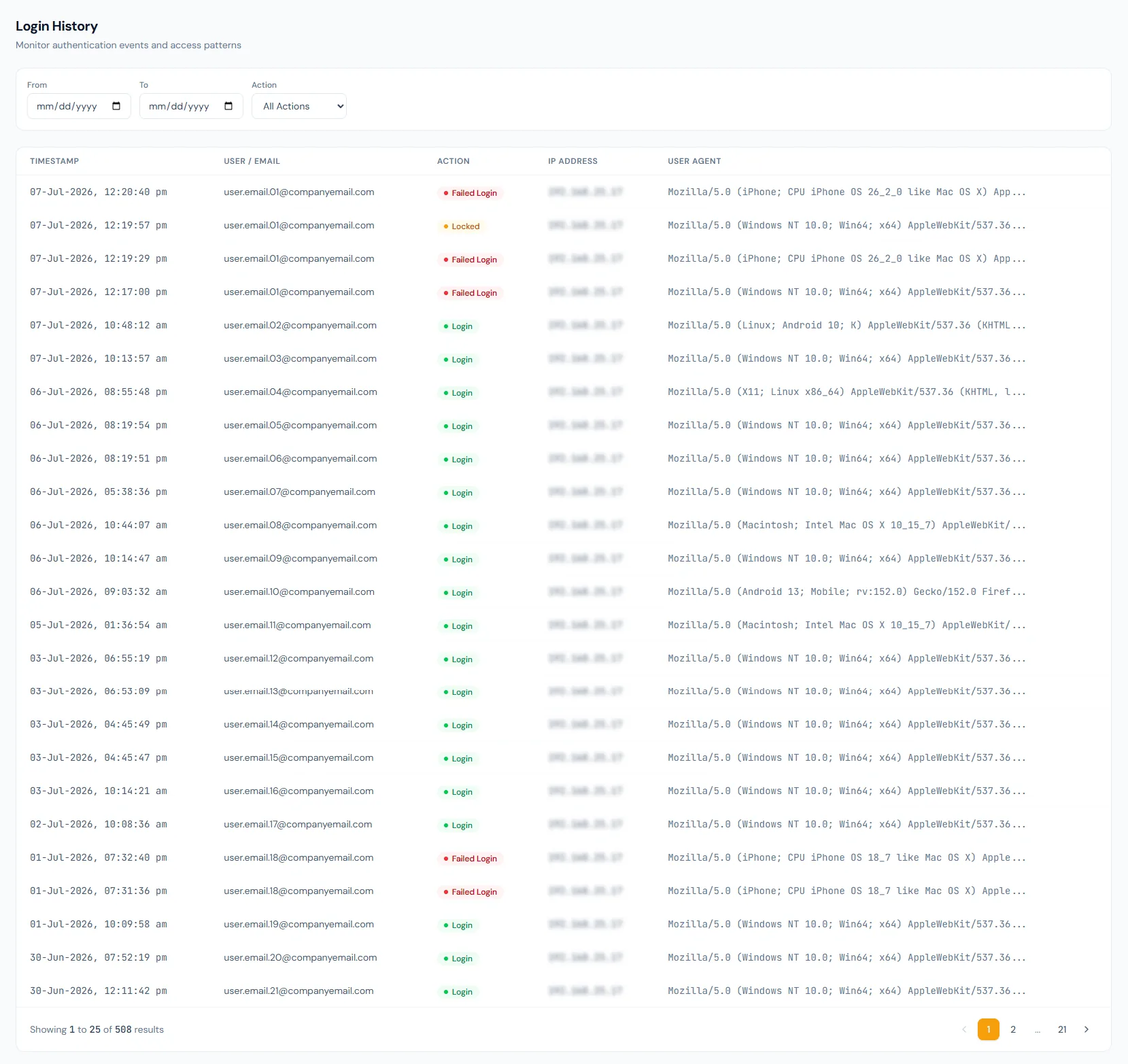
Login Activity page showing authentication events, user access history, event filters and security review controls.
THE FOUNDATION

Login Activity workflows that stay connected.

Review authentication activity including login, logout, password change, token refresh and impersonation events so administrators can spot suspicious or support-related access.

01

Login audit table

Authentication events are stored separately from business activity logs.

02

Event types

Login, logout, password changes, token refreshes and impersonation are reviewable.

03

Security review

Admins can inspect who accessed the platform and when.

WORKFLOW LIFECYCLE

Login Activity work stays structured from setup to review.

Review authentication activity including login, logout, password change, token refresh and impersonation events so administrators can spot suspicious or support-related access.

  • User signs in
  • Auth event stored
  • Admin filters log
  • Review anomaly
01
User signs inLogin Activity
Ready
02
Auth event storedLogin Activity
Ready
03
Admin filters logLogin Activity
Ready
04
Review anomalyLogin Activity
Ready
05
Take account actionLogin Activity
Done
CONTROL SURFACE

Login Activity controls keep records clean and traceable.

Choose a view to see how this module keeps daily HR work structured and reviewable.

Login event

SignIn

Successful access records user and timing information.

Values remain traceable in HRM.
SignIn detailSynced
BUILT FOR CONTROL

Details that make login activity dependable.

Login history

Authentication events can be reviewed by administrators.

Logout tracking

Session exits can be part of the account timeline.

Password event visibility

Password changes appear in the security trail.

Token refresh context

Session refresh activity helps explain ongoing access.

Impersonation audit

Support access is recorded for accountability.

Filtered review

Logs can be filtered to investigate a user or period.

CONNECTED BY DESIGN

Login Activity works with the rest of HRM.

Access Control

Shared context keeps this workflow aligned with access control records.

Connected

Role-Based Permissions

Shared context keeps this workflow aligned with role-based permissions records.

Connected

Audit Logs

Shared context keeps this workflow aligned with audit logs records.

Connected

System Administration

Shared context keeps this workflow aligned with system administration records.

Connected

Employee Documents

Shared context keeps this workflow aligned with employee documents records.

Connected
COMMON QUESTIONS

What HR teams usually ask about login activity.

Yes. Authentication history is tracked separately.

Yes. Impersonation is treated as an audit-worthy authentication event.

The administration log views are designed for focused review.

Operentra HRM / Login Activity

See how login activity fits your HR operation.

Map your current workflow to the right HRM setup, permissions and rollout plan.