
Select
Choose the report category and view: employee, attendance, leave, payroll, tax, loan, appraisal or audit.
Operentra HRM turns employee, attendance, leave, payroll, tax, loan, appraisal and audit data into filtered reports and one-click CSV exports with role-aware visibility.
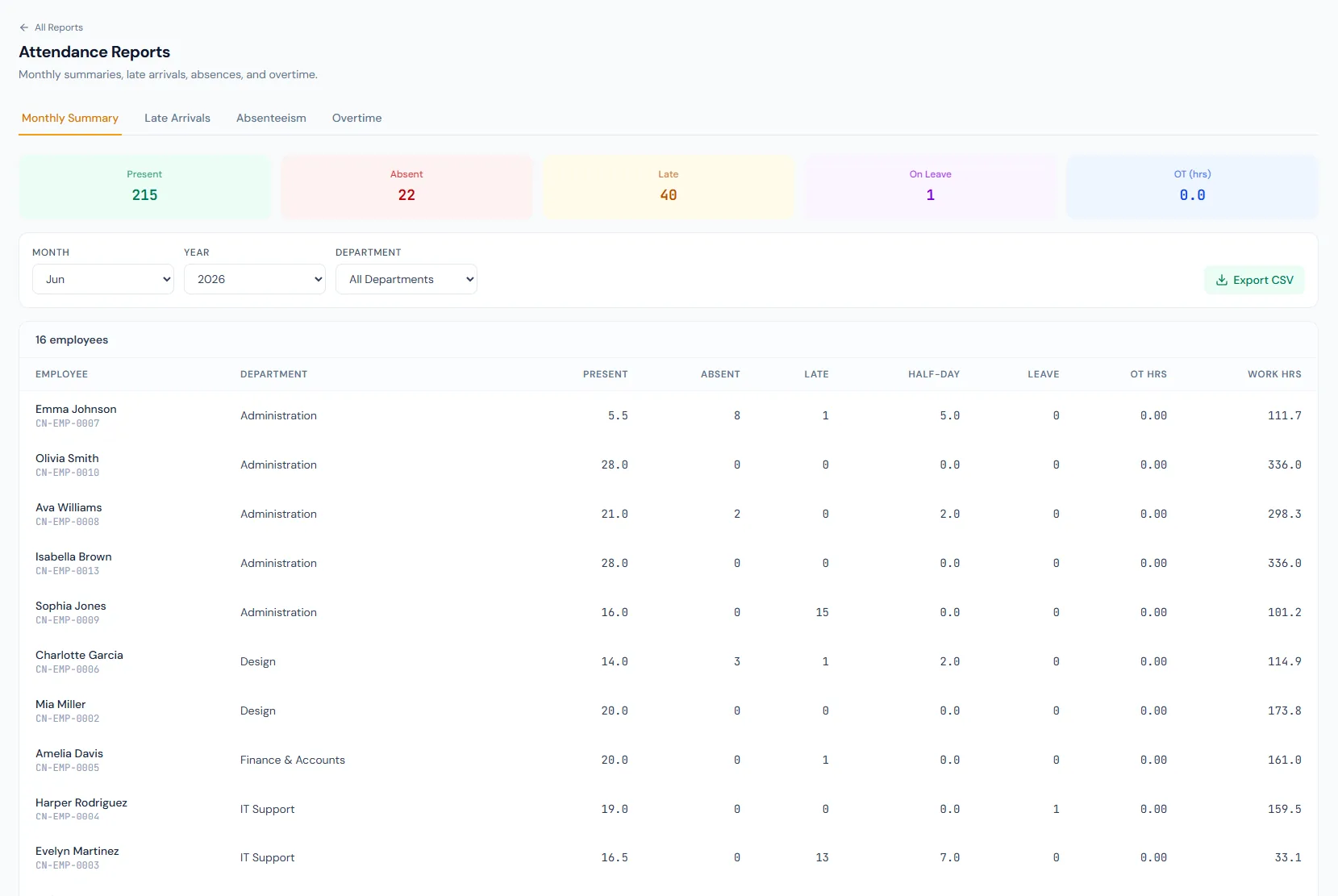
Reporting connects operational data to practical review workflows: dashboards, employee movement, attendance exceptions, leave usage, payroll costs, tax, loans, appraisals, audit evidence and controlled exports.
The Reporting module gives users a consistent flow for choosing a report, applying filters, respecting access scope, reviewing results and exporting the output for HR, finance or leadership review.
Choose the report category and view: employee, attendance, leave, payroll, tax, loan, appraisal or audit.
Narrow the result by date range, department, branch, employee, status or report-specific fields.
Apply role-based permissions so users only see the records their role and branch scope allow.
Compare summary and detailed output before turning the data into a decision or follow-up action.
Download clean CSV output with one click, ready for spreadsheets, finance review and record-keeping.
View role-aware KPIs for headcount, attendance, leave, payroll, announcements and activity.
Open featureRun the central reports engine across employee, attendance, leave, payroll, tax, loan, appraisal and audit areas.
Open featureReview directory, headcount, new joiners, separations and turnover for workforce planning.
Open featureAnalyze daily attendance, monthly summaries, late arrivals, overtime and absenteeism.
Open featureInspect balances, utilization, leave applications and pending approvals.
Open featureSummarize payroll runs, details, component totals, bank sheets and payroll variance.
Open featureReview monthly deductions, annual tax summaries and tax certificate lists.
Open featureTrack active loans, repayment schedules and loan disbursement history.
Open featureReview ratings distribution, appraisal cycle completion and increment recommendations.
Open featureExport any report to CSV with one click for spreadsheets, finance checks and archives.
Open featureEmployee, attendance, leave, payroll, tax, loan, appraisal and audit report categories are grouped into one hub, so every question has an obvious starting point.
Date range, department, branch and employee filters support focused review, so teams can narrow any report to exactly the records they need.
Report visibility respects permissions and organization scope so branch managers, department heads, HR and admins see the right records.
Every report view exports to CSV with one click, so HR and finance can take clean data straight into spreadsheets and compliance reviews.
Map your recurring reports to the right HRM filters, permissions, exports and rollout plan.
Headcount, attendance and payroll summaries are ready for leadership review without HR rebuilding spreadsheets every week.
Payroll reports, tax summaries and bank transfer sheets are easy to validate because the numbers come from the same records used to process salaries.
Employee and attendance reports help managers spot movement, absences and exceptions quickly, with consistent filters for monthly review.
Role-aware reporting keeps branch managers focused on their own teams while HR retains company-wide operational insight.
Appraisal, loan and audit reports export exactly what finance needs as CSV, without exposing unrelated HR data.
The reporting module covers employee, attendance, leave, payroll, tax, loan, appraisal and audit report categories, with dashboard and export pages around them.
Yes. Reports are designed around date range, department, branch and employee filters, plus report-specific filters such as status or payroll period.
Yes. Each report category maps to reporting permissions, and data scoping limits branch managers, department heads, HR and admins to the correct record set.
Every report exports to CSV with one click, so results open directly in Excel, Google Sheets or any finance tool.
Saved report presets are coming soon. Today, every report keeps a consistent filter layout, so rerunning a frequent report takes only a few clicks.