
+92 (3) 111 104 222 support@operentra.com 24/7
HRM features / Employee Reports Workforce reporting

Report on workforce movement and structure.

Review employee directory, headcount, new joiners, separations and turnover reports using employee, department, branch and status data from the HRM employee records.

Signup Free
Employee directory Headcount summary Turnover
Employee Reports workspaceLive
Employee reports

Employee Reports

movement and structure.Review employee directory, headcount, new joiners, separations and turnover reports using employee, department, branch and status data from the HRM employee records.
Ready
5Core views
StatusTracked
BranchScoped
Workflow snapshotView all

01Select employee reportEmployee Reports process stepActive

02Filter by date/statusEmployee Reports process stepActive

03Group by department or branchEmployee Reports process stepActive

Built aroundEmployee directoryHeadcount summaryTurnover
LIVE HRM SCREEN

Employee Reports screen with workforce movement and structure reporting.

The Employee Reports page from HRM helps teams review directory rows, headcount summaries, joiner movement, separations and turnover from one reporting view.
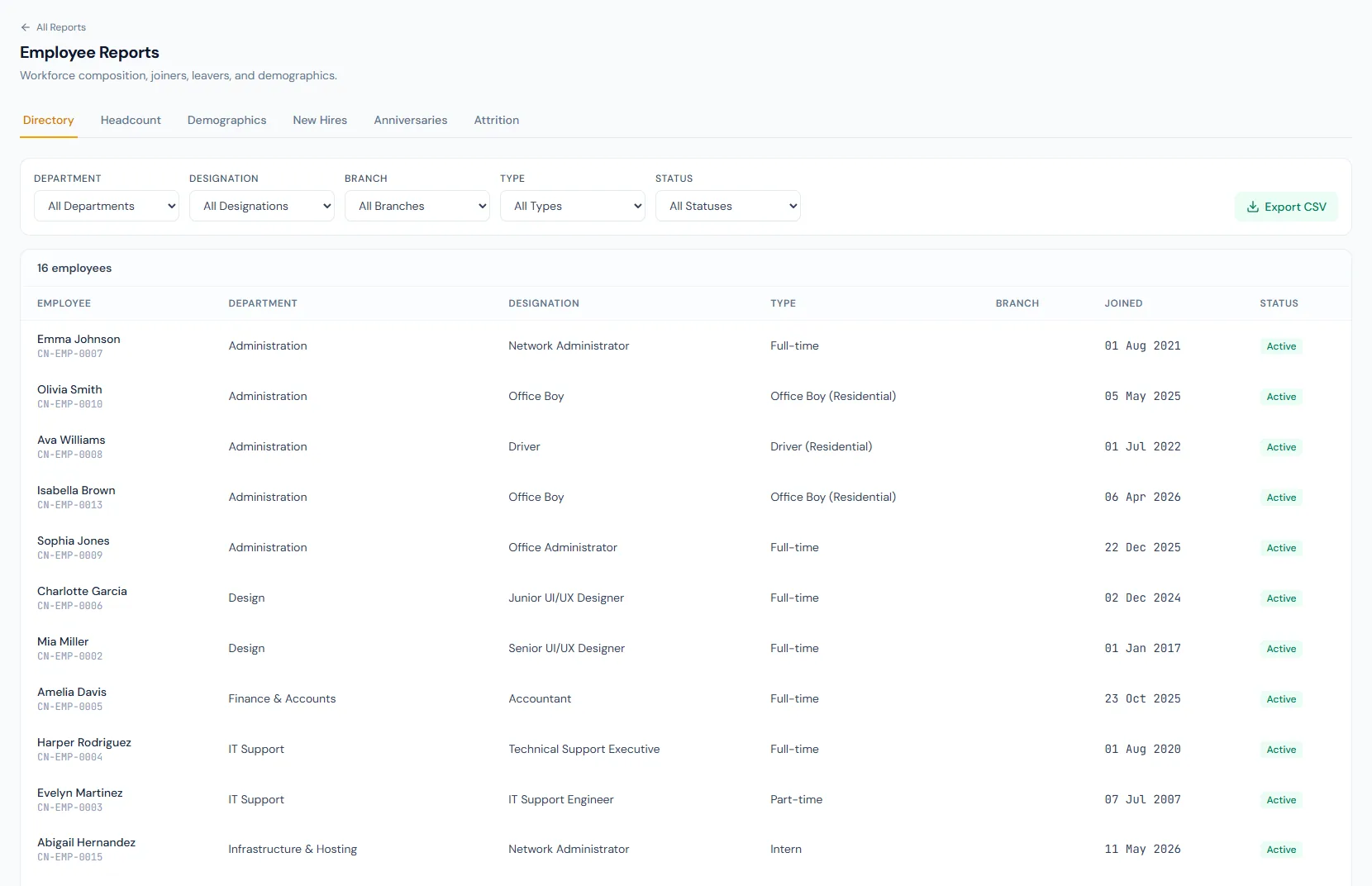
Employee Reports page showing workforce directory, headcount, new joiners, separations and turnover reporting.
THE FOUNDATION

Employee Reports workflows that stay connected.

Review employee directory, headcount, new joiners, separations and turnover reports using employee, department, branch and status data from the HRM employee records.

01

Employee directory

List employee code, name, department, designation, status and joining data for controlled workforce review.

02

Headcount summary

Break down active employees by department, branch, designation or employment type.

03

Movement reports

New joiners, separations and turnover reports help HR track workforce change over time.

WORKFLOW LIFECYCLE

Employee Reports work stays structured from setup to review.

Review employee directory, headcount, new joiners, separations and turnover reports using employee, department, branch and status data from the HRM employee records.

  • Select employee report
  • Filter by date/status
  • Group by department or branch
  • Review rows
01
Select employee reportEmployee Reports
Ready
02
Filter by date/statusEmployee Reports
Ready
03
Group by department or branchEmployee Reports
Ready
04
Review rowsEmployee Reports
Ready
05
ExportEmployee Reports
Done
CONTROL SURFACE

Employee Reports controls keep records clean and traceable.

Choose a view to see how this module keeps daily HR work structured and reviewable.

Employee list

Directory

Directory reporting gives HR a filtered employee register.

Values remain traceable in HRM.
Directory detailSynced
BUILT FOR CONTROL

Details that make employee reports dependable.

Employee directory report

Review the controlled employee register with operational fields.

Headcount report

Summarize active workforce counts by structure.

New joiners report

Track employees who joined in a selected period.

Separations report

Review employees leaving the organization.

Turnover report

Measure workforce churn over time.

Scoped exports

Export results only for the records the user is allowed to view.

CONNECTED BY DESIGN

Employee Reports works with the rest of HRM.

Dashboard

Shared context keeps this workflow aligned with dashboard records.

Connected

HR Reports

Shared context keeps this workflow aligned with hr reports records.

Connected

Departments

Shared context keeps this workflow aligned with departments records.

Connected

Branches

Shared context keeps this workflow aligned with branches records.

Connected

Employees

Shared context keeps this workflow aligned with employees records.

Connected
COMMON QUESTIONS

What HR teams usually ask about employee reports.

Employee Directory, Headcount Summary, New Joiners, Separations and Employee Turnover.

Yes. They can be grouped by department, branch and other employee dimensions.

Yes. Reports follow role and data scope rules.

Operentra HRM / Employee Reports

See how employee reports fits your HR operation.

Map your current workflow to the right HRM setup, permissions and rollout plan.