
+92 (3) 111 104 222 support@operentra.com 24/7
HRM features / Job Openings Internal requisitions

Create hiring demand with structured openings.

Create internal requisitions with title, department, designation, employment type, headcount and status before publishing a candidate-facing job posting.
Signup Free
Draft to open Headcount aware Posting linked
Job Openings workspaceLive
Opening lifecycle

Job Openings

with structured openings.Create internal requisitions with title, department, designation, employment type, headcount and status before publishing a candidate-facing job posting.
Ready
01:01Posting link
OpenPublish gate
FilledAuto status
Workflow snapshotView all

01Draft openingJob Openings process stepActive

02Set role detailsJob Openings process stepActive

03Open requisitionJob Openings process stepActive

Built aroundDraft to openHeadcount awarePosting linked
LIVE HRM SCREEN

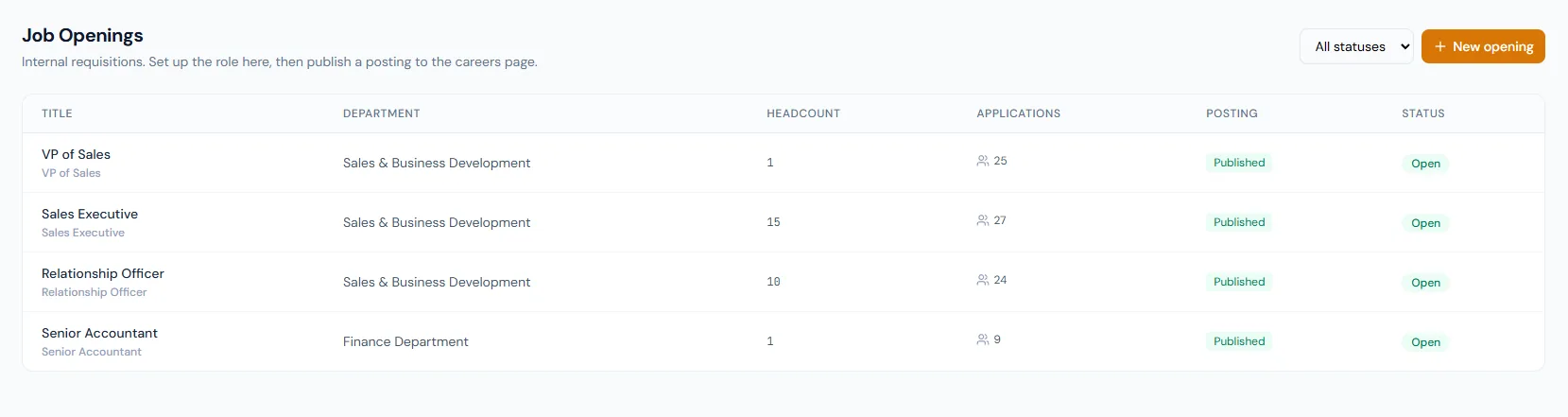
Job Openings screen with hiring requisition management.

The Job Openings page helps HR create requisitions, track opening status, manage headcount and prepare roles for public careers publishing.

Job Openings page showing recruitment openings, hiring status, department context and job posting controls.
THE FOUNDATION

Job Openings workflows that stay connected.

Create internal requisitions with title, department, designation, employment type, headcount and status before publishing a candidate-facing job posting.

01

Role setup

Each opening captures the job title, department, designation, employment type and number of hires needed.

02

Status control

Openings move from draft to open, then filled, on hold or cancelled as hiring changes.

03

Posting dependency

The public posting is tied one-to-one with the opening and can publish only when the opening is open.

WORKFLOW LIFECYCLE

Job Openings work stays structured from setup to review.

Create internal requisitions with title, department, designation, employment type, headcount and status before publishing a candidate-facing job posting.

  • Draft opening
  • Set role details
  • Open requisition
  • Create posting
01
Draft openingJob Openings
Ready
02
Set role detailsJob Openings
Ready
03
Open requisitionJob Openings
Ready
04
Create postingJob Openings
Ready
05
Track headcountJob Openings
Done
CONTROL SURFACE

Job Openings controls keep records clean and traceable.

Choose a view to see how this module keeps daily HR work structured and reviewable.

Internal preparation

Draft

HR can build the opening before it appears publicly.

Values remain traceable in HRM.
Draft detailSynced
BUILT FOR CONTROL

Details that make job openings dependable.

Structured requisitions

Openings capture the role and hiring need clearly.

Department alignment

Openings connect to department and designation structure.

Headcount tracking

The system knows how many hires are needed.

Status workflow

Draft, open, filled, on-hold and cancelled states are explicit.

Posting readiness

Publishing depends on an open requisition.

Conversion closure

Hiring the final candidate can close the opening.

CONNECTED BY DESIGN

Job Openings works with the rest of HRM.

Recruitment / ATS

Shared context keeps this workflow aligned with recruitment / ats records.

Connected

Careers Page

Shared context keeps this workflow aligned with careers page records.

Connected

Candidate Applications

Shared context keeps this workflow aligned with candidate applications records.

Connected

Candidate Pipeline

Shared context keeps this workflow aligned with candidate pipeline records.

Connected

Departments

Shared context keeps this workflow aligned with departments records.

Connected
COMMON QUESTIONS

What HR teams usually ask about job openings.

No. The posting is published after the opening is open.

Yes. Filled status can be driven by the requested headcount.

Yes. A public posting is tied one-to-one with the opening.

Operentra HRM / Job Openings

See how job openings fits your HR operation.

Map your current workflow to the right HRM setup, permissions and rollout plan.